
Shopping for a childrens fitbit in the UK is trickier than it looks. Fitbit makes two kids’ devices, and they are very different. The Ace 3 is a simple activity band for children aged six and over. The Ace LTE is a smartwatch that can call and share location, but Google lists it for the United States only. Stock changes, so check current availability before you buy. Getting it right matters, because a tracker that sits in a drawer helps nobody. This guide explains what each model does, how parental controls work, which privacy questions matter, and what else suits British families.
What Is a Childrens Fitbit?
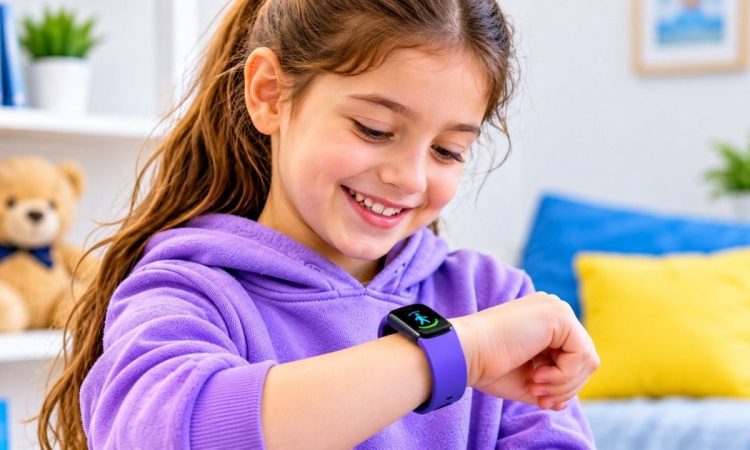
A childrens fitbit is a wearable built for kids rather than adults. It counts steps, tracks active minutes and monitors sleep. Parents manage it through a family account, so children do not need their own email address or phone.
Fitbit’s recent Ace range has two models:
- Fitbit Ace 3: a screen-based activity band for ages six and over.
- Fitbit Ace LTE: a Wear OS smartwatch for ages seven and over, with a mobile connection.
Neither is a social network on your child’s wrist. The Ace LTE has no third-party apps and no ads, according to Fitbit, and the company says it will not sell children’s health data.
Fitbit Ace 3: The Simple Option
The Ace 3 suits younger children who want an activity band rather than a smartwatch. It tracks steps, active minutes and sleep. It also nudges children to move, and it unlocks animated clock faces and badges as they hit goals.
There are no calls, messages or location tools. For many families, that is the point. A child can wear it to school, swimming or football without parents worrying about distractions.
Fitbit lists the Ace 3 as water resistant to 50 metres and quotes a battery life of up to eight days. Both figures come from the manufacturer, so treat them as best-case numbers.
The Ace 3 has been on sale for a few years. Stock can run low, so check that a UK retailer still sells it, and read the return policy.
Fitbit Ace LTE: A Smartwatch for Calls and Location
The Ace LTE launched in the US in June 2024 at $229.95. It runs Wear OS and has its own mobile connection, so children can make calls, send messages and share their location with parents.
It also turns exercise into play. Children earn rewards for moving, then spend them on a virtual pet called an eejie. Rewards stop at a daily limit, which discourages overdoing it.
Google quotes a battery life of more than 16 hours, so most families will charge it nightly. The watch is water resistant to 50 metres, and a protective bumper comes in the box.
Running costs matter too. The watch needs the Ace Pass subscription, which Google priced at $9.99 a month in the US. That covers connectivity and games.
The key point for UK readers is availability. Google’s help page says the Ace LTE and its app work only in the United States, and your Google Account must be linked to the US. Wareable’s Fitbit roundup also describes it as US-only. So importing one is not a sensible workaround. We found no confirmed UK launch date, so check Google’s UK store for updates.
How Parental Controls and Family Accounts Work
Fitbit sets up children’s profiles through a parent’s account. The parent creates the profile, approves settings and checks progress in the app. Exact steps vary by model, so follow Fitbit’s current set-up guide.
On the Ace LTE, parents also control settings such as School Time through the Fitbit Ace app.
Sit down with your child and explain what the device records. Children cope better with rules they understand. Ask them to tell you if something on the screen worries them.
Is a Childrens Fitbit Worth It?
That depends on your child and your goal. A tracker works best when it makes movement feel like a game, not a chore.
UK Chief Medical Officers advise that children and young people aged five to 18 should average at least 60 minutes of moderate to vigorous activity a day. A tracker can show roughly whether your child is getting close to that.
There are limits. Wrist trackers estimate activity, and children move in short bursts that devices can miss. Google says the Ace LTE uses a movement algorithm built for kids, but no wearable is exact.
Use the sleep data as a conversation starter about bedtime routines, not as a score.
Think about the child, too. Some children enjoy chasing goals. Others may feel pressure or compare numbers with friends. If a tracker makes your child anxious, take it off and focus on play instead.
Can a Kids’ Fitbit Replace a First Phone?
The Ace 3 cannot, because it has no calling or messaging. The Ace LTE can cover basic contact, which suits children who are not ready for open internet access.
Only you can judge readiness. Some families start with a simple band, then move to a phone later. Whatever you decide, keep talking about what children see and do online.
Privacy and Safety Checks for UK Families
These devices collect personal data, including activity, sleep and sometimes location. In the UK, the Information Commissioner’s Office (ICO) publishes the Children’s Code, which sets standards for online services likely to be used by children.
Before you set one up, run through these checks:
- Read the privacy policy and the data settings in the family account.
- Share location only when your child actually needs it.
- Agree rules together, such as when the watch stays off, including during lessons.
- Check your child’s school policy on wearable devices.
- Use a strong password on the parent account and turn on two-step verification.
Alternatives You Can Actually Buy in the UK
If the Ace LTE is out of reach, other options exist. Prices and features change, so compare current listings and independent reviews.
- Garmin Vivofit Jr 3: a durable activity band with no subscription, aimed at younger children.
- Apple Watch with Family Setup: needs a parent’s iPhone and a cellular model, plus a compatible mobile plan.
- Kids’ smartwatches from brands such as Xplora: these offer calls and location, though quality and privacy practices vary, so read reviews carefully.
How to Choose the Right Option
Start with what your child actually needs. Then match it to a device.
- Younger children, activity only: the Ace 3 or Garmin Vivofit Jr 3 keep things simple.
- Older children who walk to school alone: a calling watch may help, but ask whether a basic phone would be cheaper.
- Tight budget: avoid monthly fees and choose a band with a long battery life.
Whatever you pick, check the warranty, battery life and whether the companion app supports your phone. Avoid unofficial sellers with no UK warranty.
Common Mistakes to Avoid
Parents can sidestep most problems by avoiding these slips:
- Buying on features alone, without checking the monthly cost.
- Treating step targets as rules rather than gentle encouragement.
- Handing over the watch without explaining privacy settings.
- Choosing a loose or ill-fitting band, which affects readings and comfort.
- Ignoring the return policy when buying from a third-party seller.
Frequently Asked Questions
Can you buy a childrens fitbit in the UK?
The Fitbit Ace 3 may still be available from UK retailers, depending on stock. The Ace LTE is listed by Google as US-only, so check official UK stores before buying.
What age is the Fitbit Ace suitable for?
Fitbit says the Ace 3 is designed for children aged six and over. The Ace LTE is for ages seven and over. Parents manage both through a family account.
Does the Fitbit Ace LTE need a subscription?
Yes. The Ace Pass plan enables calling, messaging, location sharing and games. In the US it launched at $9.99 a month, but UK pricing has not been confirmed.
Is a kids’ fitness tracker safe for children?
It can be, when parents control the account, limit data sharing and read the privacy policy. The ICO’s Children’s Code guidance explains what good practice looks like.
Conclusion
A childrens fitbit can make exercise more fun, but the right model depends on your child’s age and your priorities. The Ace 3 suits families who want a simple activity band. The Ace LTE offers calling and location sharing, yet Google lists it for the United States only.
Compare current UK options, check running costs, and set clear privacy rules from day one. Start small, review how it goes, and let your child’s enjoyment guide the next step. Used sensibly, a tracker can encourage healthy habits without taking over family life.
for more information click here