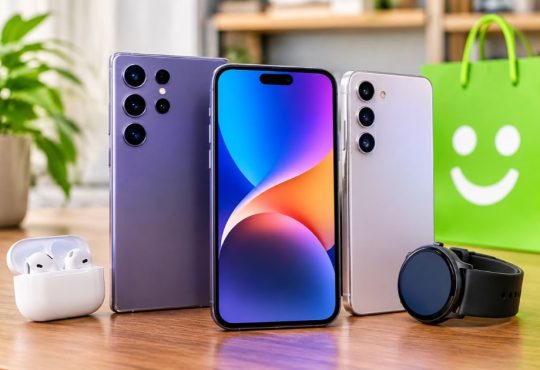

iPhone or Android? It is the question almost every UK phone buyer asks sooner or later. The honest answer is that neither is better for everyone. The right choice depends on your budget, the devices you already own and how long you want the phone to last.
Both platforms now offer fast chips, excellent cameras and strong security. The real differences sit in the details: software updates, pricing, customisation and how well the phone works with your laptop, watch or family. This guide explains those differences in plain English, so you can choose with confidence. We also explain who each platform suits best.
iPhone or Android: The Short Answer
Choose an iPhone if you want a simple, polished phone that works smoothly with other Apple products and keeps its resale value well. Choose Android if you want more choice, lower prices and flexible settings.
- iPhone suits people who value simplicity, long support and the Apple ecosystem.
- Android suits people who want variety, customisation and phones at every price.
- Budget buyers usually find more choice on Android.
- Households with iPads, Macs or an Apple Watch often find an iPhone easier.
Price and Value: What Will You Actually Pay?
Android covers every budget. In the UK, you can buy a capable Android handset for well under £200. Flagship models from Samsung and Google cost roughly the same as a new iPhone. Apple sells fewer models, and its cheapest current iPhone still costs more than a budget Android.
Prices change often, so check retailers and networks before you buy. Compare the handset price with the monthly contract cost too. SIM-only deals can also work out cheaper if you keep a phone for several years. Trade-in schemes from retailers and networks can reduce the upfront cost, though offers change regularly.
Resale value matters as well. Used iPhones tend to hold their worth better, which softens the cost when you upgrade. Premium Samsung and Google phones also resell reasonably well, but budget Android models lose value quickly.
Think about the total cost over three years. Include the handset, a case, a screen protector and the likely trade-in value.
Software Updates: How Long Will Your Phone Last?
Updates keep your phone secure, so they matter more than most buyers realise. Apple supports iPhones for many years and releases updates to all compatible models together. In practice, recent iPhones have received around six or seven years of iOS updates, although Apple does not publish a formal promise.
Android is more varied. Google promises seven years of updates for Pixel 8 and later models, and Samsung offers seven years on recent Galaxy S phones. Cheaper handsets from other brands often get far less, sometimes only two or three years.
Always check the manufacturer’s stated update period before buying an Android phone. A bargain that stops receiving security patches after two years is not much of a bargain.
UK law helps here. Rules under the Product Security and Telecommunications Infrastructure Act, in force since April 2024, require manufacturers to publish how long they will provide security updates for connected devices, including phones.
Ecosystem: Which Phone Works Best with Your Other Devices?
Apple’s ecosystem is its biggest strength. AirDrop, iMessage, FaceTime and iCloud work together with almost no setup. If your household already uses iPads or Macs, an iPhone slots in naturally. An Apple Watch also needs an iPhone, which settles the question for many buyers.
Android works well with Windows laptops, Chromebooks and a huge range of smartwatches, earbuds and smart home gadgets. Google apps such as Gmail, Maps and Photos run well on iPhones too, so switching rarely means losing your data. Samsung owners also get extras when they pair a Galaxy phone with Galaxy watches and tablets.
Messaging deserves a mention. iPhone-to-iPhone chats use iMessage, while Android uses Google Messages. Apple now supports RCS, which improves texts between the two, but a few features still differ.
Customisation and Control
Android gives you more freedom. You can change launchers, icons, default apps and home screen layouts. Transferring files by cable is simple, and some models still accept microSD cards.
iPhones are more controlled. Apple has added widgets, custom icons and more home screen options in recent years, but the experience stays consistent. Many people see that as a benefit, because everything feels familiar and predictable.
Freedom comes with responsibility. If you enjoy tweaking settings, Android will reward you. If you simply want a phone that works, an iPhone asks less of you.
Is iPhone or Android Safer for Privacy and Families?
Both are secure when kept up to date. Apple controls the hardware and software, which limits malware risks. Android’s Google Play Protect scans apps, but risk rises if you install apps from outside the Play Store.
Both platforms let you control app permissions, location sharing and tracking. Check these settings on any new phone, whichever you choose.
Parents are well served on either side. Apple offers Screen Time and Family Sharing, while Google provides Family Link. Both let you approve apps, set limits and manage a child’s account.
Cameras, Battery and Everyday Speed
Flagship phones on both sides take excellent photos. iPhones are known for reliable video and consistent colour. Google’s Pixel range leans on clever image processing, and Samsung’s top models often excel at zoom.
Battery life depends on the individual model rather than the platform, so read independent reviews. Speed follows the same rule. High-end Android phones are as quick as any iPhone, while budget models can feel sluggish sooner.
Apps, Games and Accessories
Almost every major app appears on both platforms. Banking apps, WhatsApp, BBC iPlayer, navigation tools and prayer-time or Quran apps all work well on iPhone and Android. New apps and games sometimes reach iPhone first, but the gap is small.
Accessories differ more. iPhones have a huge case, charger and accessory market, so finding a match is easy. Android accessories vary by brand, which makes it wise to check compatibility before you buy a case or wireless charger.
Switching from One to the Other
Switching is easier than it used to be. Apple’s Move to iOS app and Google’s built-in transfer tools copy contacts, photos, calendars and messages across. WhatsApp chats can also be moved, although you should read the current instructions first.
Some things do not carry over. Paid apps must be bought again on the new platform, and subscriptions may need re-activating. Back up everything before you start, and keep the old phone until you are sure nothing is missing.
Which Should You Buy? Real-Life Examples
- A student on a tight budget: a mid-range Android phone with a clear update promise.
- A family with iPads and Macs: an iPhone, for easy sharing and setup.
- Someone who loves tweaking: Android, for launchers and deeper settings.
- A buyer who wants long-term value: an iPhone, or a recent Pixel or Galaxy flagship.
- A first-time smartphone user: either platform, with large text and simple layouts switched on.
If you are still undecided, visit a shop and handle both. Comfort matters more than a spec sheet. Write down your top three priorities, such as price, updates and ecosystem, then match them against two or three models.
Frequently Asked Questions
Is iPhone or Android better for beginners?
Both suit beginners. iPhones offer a consistent, simple layout, while Android phones let you enlarge text and simplify screens. Choose whichever feels more comfortable in a shop, or ask a friend who owns one.
Which lasts longer, an iPhone or an Android phone?
Premium models from both last many years. iPhones usually receive updates for six or seven years, while Pixel and recent Galaxy flagships promise seven. Budget Android phones often get far fewer.
Is it hard to switch from iPhone to Android?
No. Transfer apps move contacts, photos and calendars, and most major apps exist on both platforms. Paid apps and subscriptions may need repurchasing, so back up your data first.
Is iPhone or Android cheaper in the UK?
Android is usually cheaper at the budget end, with capable phones under £200. At flagship level, prices are similar, but used iPhones often resell for more.
Conclusion
The iPhone or Android decision comes down to your priorities, not a single winner. An iPhone suits people who want simplicity, long support and a smooth Apple ecosystem. Android suits those who want choice, flexibility and lower prices. Check the update promise, count the total cost and think about the devices you already own. Try both in a shop if you can. Choose the phone that fits your daily life and budget, and you are likely to enjoy it for years.
for more information click here